.png)
Proper Desk Ergonomics
For many people, the modern workday involves hours spent sitting at a desk, typing on a computer, attending virtual meetings, or looking down at a phone. While desk jobs may not seem physically demanding, prolonged sitting and poor posture can place significant stress on the body over time.
At Royal City Physio, we regularly help people manage neck, back, shoulder, and wrist pain related to desk work. The good news is that with a few simple ergonomic adjustments and regular movement throughout the day, many of these aches and pains can be reduced or even prevented altogether.
Why Desk Ergonomics Matter
Desk ergonomics refers to how your workstation is arranged to support your body while working. A properly set up desk helps reduce unnecessary strain on muscles, joints, tendons, and nerves during repetitive daily tasks.
When posture is poor for long periods of time, the body often compensates in ways that create excessive tension and stress. Common examples include:
Leaning forward toward the screen
Rounded shoulders while typing
Slouching through the lower back
Looking down at a laptop for hours
Reaching too far for a mouse or keyboard
Over time, these positions can contribute to muscle fatigue, stiffness, headaches, and ongoing discomfort.
Good desk ergonomics can help:
Reduce neck, back, and shoulder pain
Improve comfort and focus throughout the day
Decrease muscle tension and fatigue
Improve posture and circulation
Lower the risk of repetitive strain injuries
Even small changes to your workstation can have a meaningful impact on how your body feels during and after work.
What Proper Desk Ergonomics Should Look Like
Many people don’t realize that the way their desk is set up may be contributing to their pain. A properly arranged workstation should allow your body to stay in a comfortable, supported, and neutral position throughout the day.
Here are some simple guidelines to follow when setting up your desk:
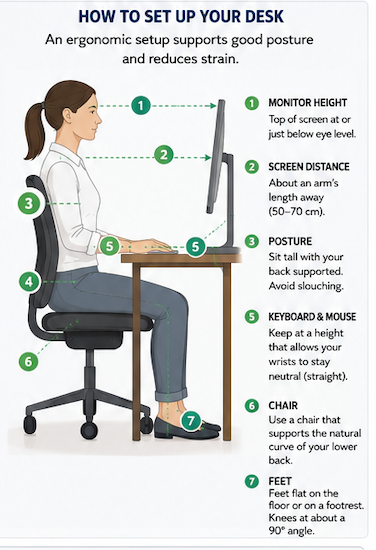
Monitor Height
Your monitor should be positioned roughly an arm’s length away, with the top third of the screen near eye level. This helps reduce forward head posture and neck strain.
If you use a laptop regularly, consider using a laptop stand or external monitor to avoid constantly looking downward.
Chair Support
Your chair should support the natural curve of your lower back. Sit fully back in the chair rather than perched forward on the edge.
Ideally:
Knees should be bent around 90 degrees
Feet should rest flat on the floor or a footrest
Hips should be level with or slightly higher than the knees
Keyboard and Mouse Position
Your keyboard and mouse should be close enough that your elbows remain relaxed at your sides. Your shoulders should stay relaxed rather than elevated or reaching forward.
Wrists should remain in a neutral position instead of bent upward for prolonged periods.
Sitting Posture
Aim to sit tall with:
Ears aligned over the shoulders
Shoulders relaxed
Lower back supported
Feet planted firmly
It’s important to remember that there is no “perfect posture” to hold all day. The best posture is one that changes regularly through movement and position changes.
Common Injuries Associated With Poor Desk Ergonomics
Poor workstation setup combined with prolonged sitting can contribute to a variety of musculoskeletal issues.
Neck and Upper Back Pain
One of the most common complaints among desk workers is neck and upper back tension. Looking down at screens or leaning forward for long periods places increased stress on the muscles supporting the neck and shoulders.
This can lead to:
Tightness through the neck and upper traps
Headaches
Shoulder tension
Reduced mobility
Lower Back Pain
Prolonged sitting, especially with slouched posture, can place increased pressure on the lower back. Weakness and stiffness may also develop when the hips and core remain inactive for extended periods.
Wrist and Hand Strain
Improper keyboard and mouse positioning may contribute to repetitive strain injuries involving the wrists, hands, and forearms.
Symptoms may include:
Wrist pain
Tingling or numbness
Hand fatigue
Forearm tightness
In some cases, prolonged compression and repetitive movements may contribute to conditions like Carpal Tunnel Syndrome.
Shoulder Pain
Rounded shoulders and prolonged reaching can overload the muscles surrounding the shoulder blades and shoulder joint, contributing to discomfort and muscle imbalance.
Hip Tightness and Reduced Mobility
Sitting for long periods often leads to tight hip flexors and reduced mobility through the hips and pelvis, which can eventually contribute to discomfort during walking, standing, or exercise.
Simple Ways to Reduce Desk-Related Pain
The body is designed to move. Even the best ergonomic setup can become uncomfortable if maintained for too long without movement.
Here are a few simple strategies to help reduce postural strain throughout the day:
Take Regular Movement Breaks
One of the most effective things you can do is simply move more often.
Try to:
Stand up every 30–60 minutes
Walk during phone calls
Stretch between meetings
Refill your water regularly
Alternate between sitting and standing if possible
Even brief movement breaks can improve circulation and reduce stiffness.
Try Simple Desk Exercises

Chin Tucks: Gently pull your head straight backward to create a “double chin.” This helps activate the deep neck muscles and counteracts forward head posture.
Shoulder Blade Squeezes: Pull your shoulder blades gently together and hold for 3–5 seconds before relaxing. Repeat several times throughout the day.
Seated Spinal Extensions: Sit tall and gently arch backward over the backrest of your chair to help reverse prolonged slouching.
Wrist Stretches: Stretching the wrists and forearms can help reduce tension from typing and mouse use.
Standing Hip Stretch: Standing up and stretching the front of the hips can help relieve stiffness caused by prolonged sitting.
When to Seek Help
If pain or stiffness persists despite improving your workstation setup and increasing movement throughout the day, it may be helpful to consult a physiotherapist.
At Royal City Physio, we can help assess:
Your posture and movement patterns
Muscle tightness and weakness
Workplace ergonomic setup
Repetitive strain concerns
Treatment may include hands-on therapy, exercise prescription, postural education, and strategies to help you feel more comfortable and move better throughout your workday.
Final Thoughts
Desk work is a major part of modern life, but discomfort doesn’t have to be. Small ergonomic adjustments, regular movement, and strengthening key muscle groups can make a significant difference in reducing pain and improving comfort throughout the workday.
Your body responds well to consistency — even a few minutes of movement and posture awareness throughout the day can help support long-term health and function.
Comments